
Client billing
plans and credit packs through your Stripe.
Kiln can sell monthly plans and one-time credit packs to your clients through your own Stripe account. The money goes straight to you; Kiln never holds it. Billing is optional: with it switched off you assign plans and credits by hand in the console.
01Plans
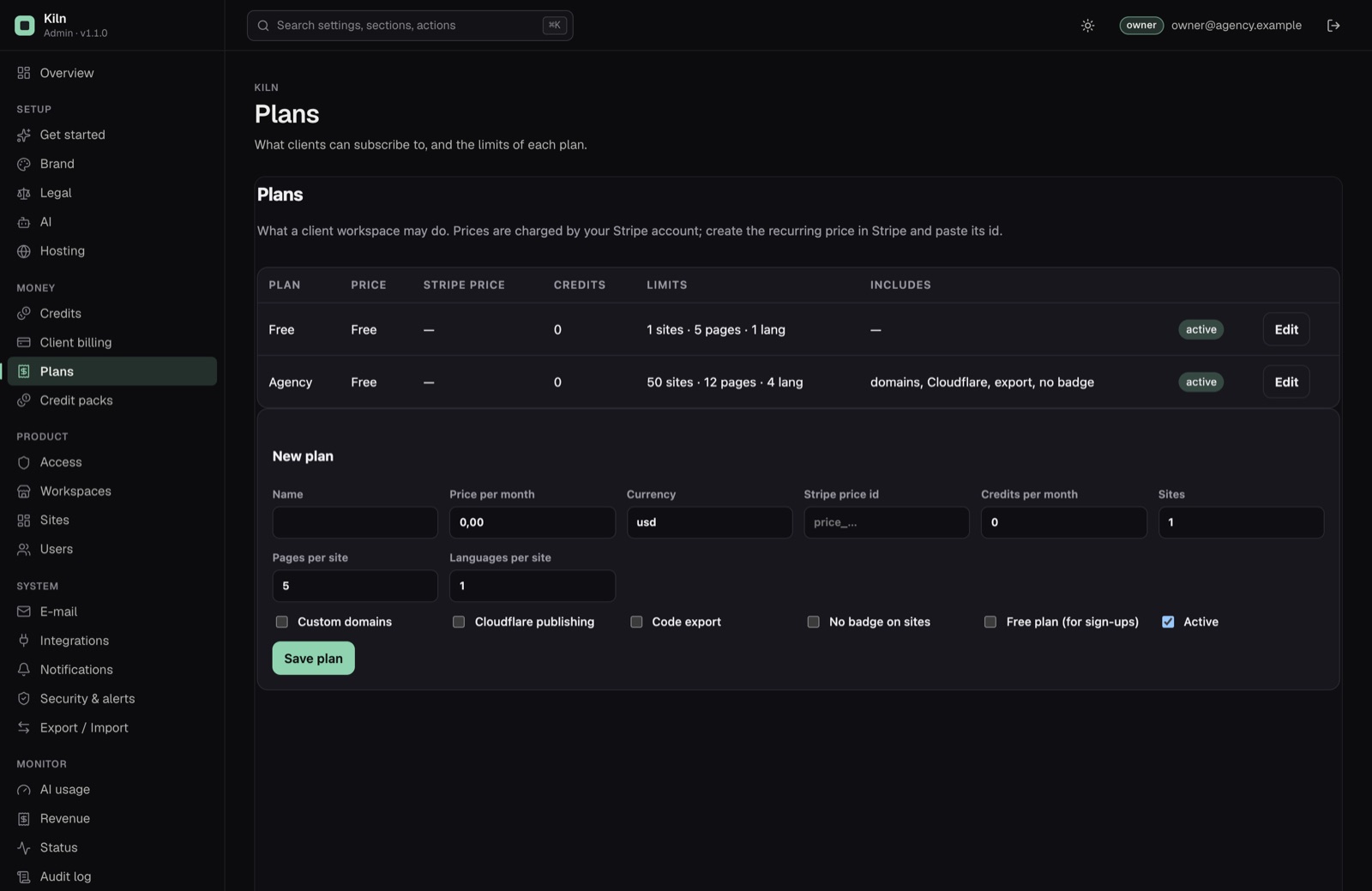
Console → Plans. Each plan has:
| Field | What it does |
|---|---|
| Name | Shown to clients on their Plan and credits page. |
| Price per month, Currency | Shown to clients. The amount actually charged comes from the Stripe price below, so keep both the same. Currency is a three-letter code (usd, eur). |
| Stripe price id | The id of a recurring price in Stripe (price_…). Required for every paid plan that clients can buy online. |
| Credits per month | Added to the workspace each time Stripe reports a paid invoice (the first one included). Unused credits carry over. |
| Sites | How many sites the workspace may have. Example sites from the demo do not count. |
| Pages per site | 1 to 50. |
| Languages per site | 1 to 20. |
| Custom domains | Allows adding the client's own domain to a site. |
| Cloudflare publishing | Allows deploying to your Cloudflare account. |
| Code export | Allows the HTML and Astro ZIP downloads. |
| No badge on sites | Hides the badge (Hosting → Badge) on this plan's published sites. |
| Free plan (for sign-ups) | New workspaces get the first active free plan. |
| Active | Inactive plans are not offered. Plans cannot be deleted; deactivate them instead. |
On the first start Kiln creates a Free plan: 1 site, 5 pages, 1 language, no custom domains, no Cloudflare, no export, badge shown. Change it to suit you.
The status check Plans are consistent warns when there is no active free plan, or when an active paid plan has no Stripe price id.
You can move any workspace to any plan by hand on the console's Workspaces page, with or without Stripe.
02Credit packs
Console → Credit packs → New credit pack: a name, the number of credits, a price (at least 0.50) and a currency. Clients see active packs under Top up credits. Packs need no product in Stripe: Kiln sends the name and price with each checkout. The receipt line reads <Name on receipts>: <pack name> (<credits> credits).
03Setting up Stripe
Use test mode in Stripe first (the toggle in the Stripe dashboard), then repeat the steps in live mode.
1. The secret key
Stripe → Developers → API keys → Secret key (sk_test_… or sk_live_…). Paste it in the console under Integrations → Stripe secret key and click Test: it answers test key or live key.
2. The webhook
Stripe tells Kiln about payments through a webhook. Without it, payments go through in Stripe but Kiln never records them, never adds credits and never changes plans.
- Stripe → Developers → Webhooks → Add endpoint.
- Endpoint URL:
<your public URL>/webhooks/stripe, for examplehttps://build.your-agency.example/webhooks/stripe. It must be reachable from the internet over https. - Select exactly these events:
checkout.session.completedinvoice.paidcheckout.session.async_payment_succeeded(for payment methods that settle later)customer.subscription.updatedcustomer.subscription.deleted
- Save, then reveal the Signing secret (
whsec_…) and paste it under Integrations → Stripe webhook signing secret.
Test and live mode have different endpoints and different signing secrets.
3. A recurring price for each paid plan
- Stripe → Product catalog → Add product, e.g. "Website plan: Pro".
- Add a price: Recurring, Monthly, the amount and currency you want.
- Save and copy the price id (
price_…) from the price's details. - Console → Plans → edit the plan → paste it in Stripe price id, set the same amount in Price per month.
4. The customer portal
The Invoices and payment method button on the client's billing page opens Stripe's customer portal, where the client sees invoices, changes the card and cancels. Activate it once in Stripe → Settings → Billing → Customer portal, and save the settings (in test mode and in live mode).
5. Switch billing on
Console → Client billing:
- Sell plans and credit packs: turn it on. While it is off, clients see "Online payments are not switched on. Ask the agency to change your plan or add credits."
- Name on receipts: the product name on credit pack receipts (default "Website builder").
- Customers can enter promotion codes at checkout (off by default): Stripe Checkout then shows a field for a promotion code, for plans and credit packs. Create the coupon and its promotion codes in your Stripe dashboard; Kiln does not create or check codes itself.
The status check Stripe keys are complete turns green when billing is on and both the secret key and the webhook secret are set.
Stripe takes its fee from each successful payment and may charge for some features. The money goes to your Stripe account; Kiln never holds it. See Costs.
04What clients see
In the builder, a workspace's Billing page shows the current plan, the credit balance, every active plan, the credit packs, the price of each AI action and the credit history.
Only workspace owners (and agency staff) can buy. Switch to <plan> and the pack buttons open Stripe Checkout. After paying, the client comes back to the billing page with the note "Payment received by Stripe. Your plan or credits update as soon as Stripe confirms it, usually within a minute."
05What Kiln does with each Stripe event
Kiln checks the webhook's signature first and rejects anything that does not match. Each event is processed only once, even if Stripe sends it again.
| Event | Effect |
|---|---|
checkout.session.completed (credit pack, paid) | Adds the pack's credits and records the payment. |
checkout.session.completed (plan) | Links the subscription to the workspace, switches the plan, status active. |
checkout.session.async_payment_succeeded | Same as a paid checkout, for methods that settle later (bank debits). |
invoice.paid | Records the payment, adds the plan's monthly credits, updates the period end. Stripe does not guarantee the order of events: when the first invoice arrives before the checkout event, Kiln links the workspace from the subscription's metadata, or answers 409 so Stripe sends it again later. |
customer.subscription.updated | Copies the subscription status (for example past_due). |
customer.subscription.deleted | Status canceled; the workspace moves to the first active free plan. |
06Revenue in the console
The console's revenue screen and the Plan subscriptions and Credit packs sources list only payments Stripe confirmed: paid invoices and paid credit-pack checkouts, each with its Stripe reference. Nothing is estimated or projected. Credits you add by hand are not revenue. Stripe's own fees are not subtracted; see your Stripe dashboard for payouts.
07Without Stripe
Leave Sell plans and credit packs off. Then:
- assign plans on the Workspaces page (Plan for …),
- add credits there with an amount and a reason (the reason appears in the workspace's credit history),
- invoice your clients however you already do.